Software for Radiopharmaceutical Therapy Trials

Built to keep multi-site trials
on protocol, on schedule.

NuQ is Oncosia's locally installed toolbox for nuclear medicine departments and radiopharmaceutical therapy trial teams. ScanPointQ plans multi-timepoint imaging and PK sampling; DICOM Checker automates acquisition QC — both in active use on trials where Oncosia is the expert vendor. An SUV Calculator is included for SPECT SUV research.

Scroll
Module 1 — ScanPointQ

Spot a scheduling conflict before it becomes a missed timepoint.

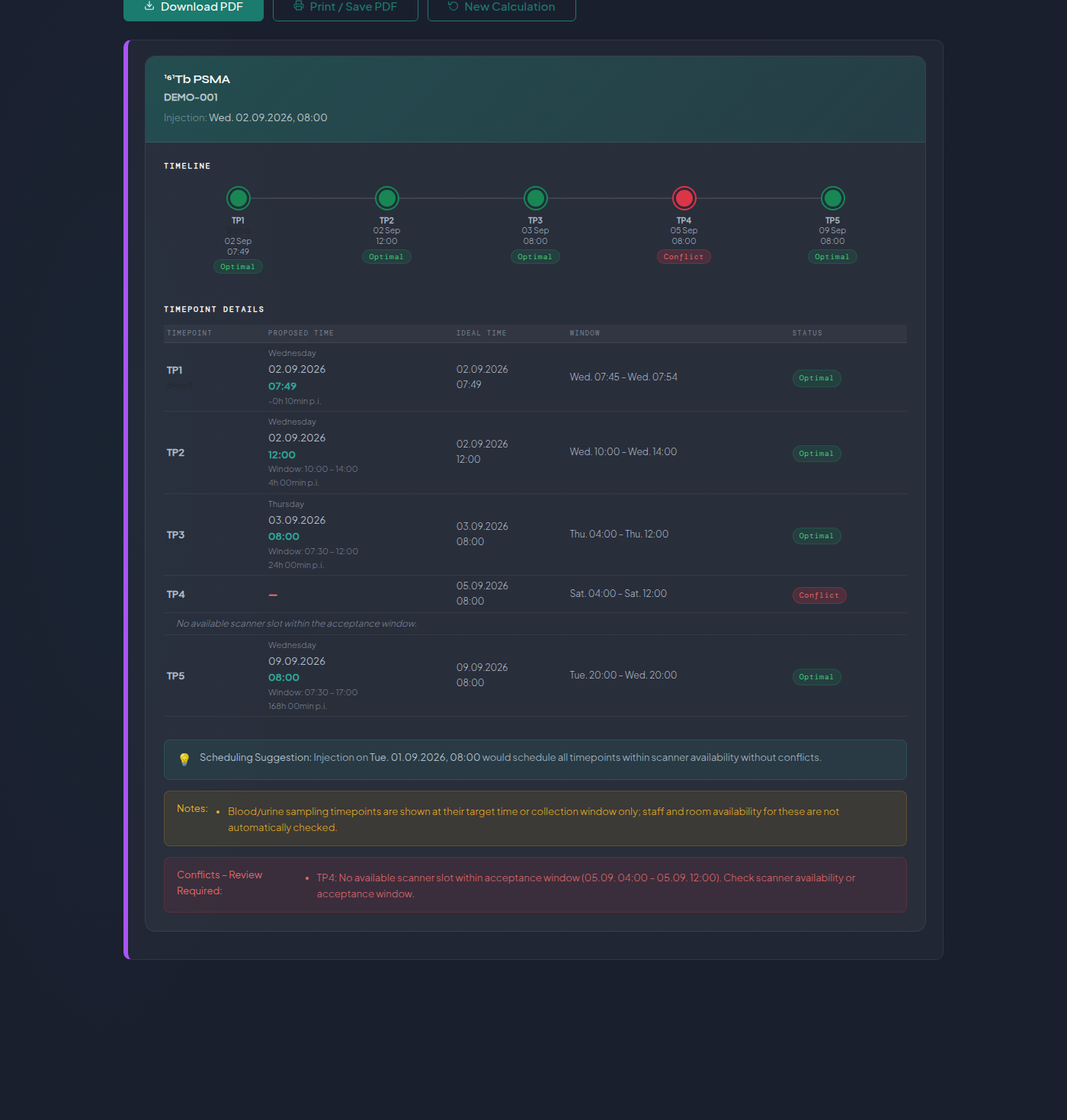
Configure the injection once, and ScanPointQ calculates every scan and sample appointment from it automatically — imaging timepoints alongside blood and urine draws for pharmacokinetic analysis, with no limit on how many. Scanner hours, weekends, and public holidays for any country are factored in without anyone doing the arithmetic by hand.

Flags the problem, then suggests the fix A timepoint that would land outside scanner hours or on a public holiday is flagged immediately — and ScanPointQ proposes an alternative injection time that clears every conflict in the schedule, not just the one it found.
Imaging + blood/urine sampling for PK analysis, no timepoint limit — one schedule, any mix, any length
Conflict detection with a suggested fix — an alternative injection time that clears every conflict at once
Week-at-a-glance for every plan — scans and samples together, for up to 3 patients sharing a scanner, with cross-patient conflict checks
Automatic PDF report creation with sign-off — initials and a checkbox for whoever performs each scan or sample, plus a dose/kit verification line
Module 2 — DICOM Checker

A QC check that's faster than a visual review — and catches more.

Upload a file and DICOM Checker pre-fills the reference protocol and site automatically. Run the check, get a result immediately, and export a QC report with one click — no printer, no re-upload just to change the cycle or timepoint. The same three workflows apply whatever therapeutic radionuclide is in use — checks run against your protocol's own reference values, not a fixed isotope list.
Catches what a quick check misses For SPECT/CT acquisitions, energy-window bounds are validated, not just the centre — with a Warning tier for borderline cases instead of a blunt pass/fail. PET checks catch a missing or incorrect calibration factor, or missing attenuation correction, before either silently invalidates a dosimetry calculation.
Three QC workflows — NM SPECT/CT, RT Plan, and PET
Pass / Warning / Mismatch, not just Pass/Fail — a borderline case is flagged, not blanket-passed or blanket-failed
Every row shows its source DICOM tag — a full audit trail, not just a result
One-click PDF, no printer needed — server-generated, ready for the QC record
NuQ Shared Registry
Protocol & Site Registry · Shared by Both Modules
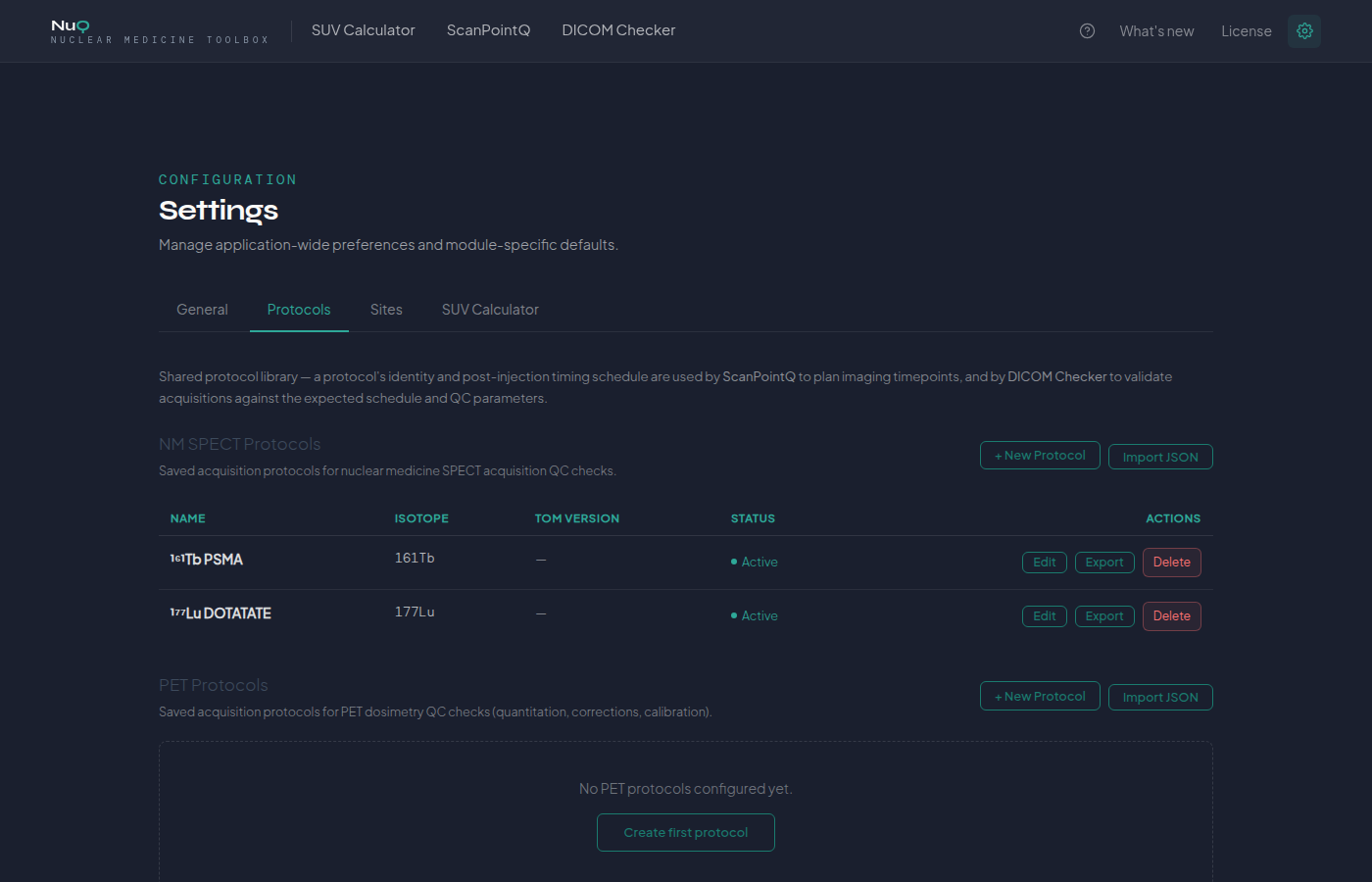
Central protocol library — reference values and timepoint schedule defined once, used by ScanPointQ and DICOM Checker alike
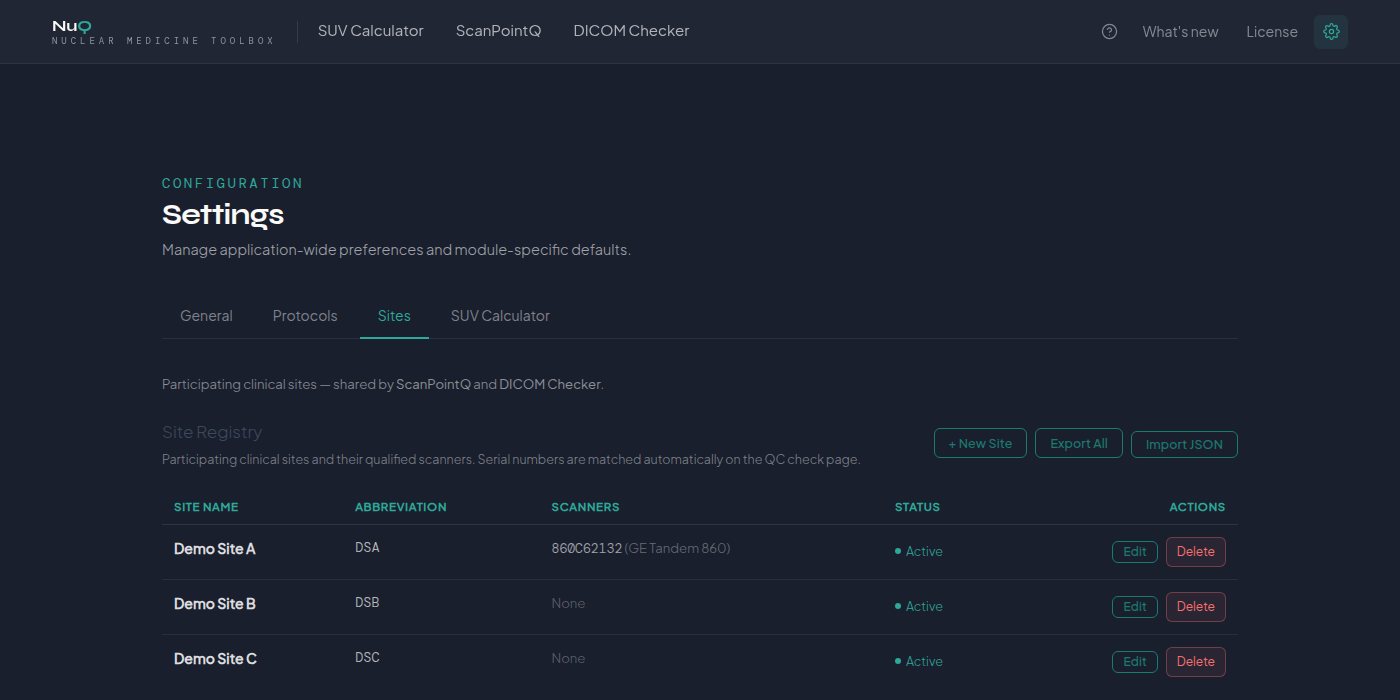
Central site registry — scanners, availability, and holiday calendar defined once per site
Full traceability — every check and every schedule references the exact registry entry it ran against
Export / import as JSON — move a protocol or the whole site registry between installations
Shared Infrastructure

One protocol, one site registry — traceable everywhere it's used.

DICOM Checker and ScanPointQ draw from the same central Protocol and Site registry — a protocol's reference values and timepoint schedule, and a site's scanners, are defined once and used by both modules everywhere they're deployed. It's the same registry we rely on ourselves, on every trial where Oncosia is the expert vendor.

One definition, not one per site A QC deviation or a scheduling conflict is never a matter of whose copy of the protocol was in use — every site, every cycle, traces back to the same source, consistently, across the whole trial.
Module 3 — SUV Calculator

SPECT SUV, with every step of the calibration shown.

A growing body of literature investigates the clinical potential of SPECT SUV — but quantitative SPECT depends on a scanner-specific calibration factor that PET-focused tools often assume away. The SUV Calculator makes that step explicit, for nuclear medicine physicists and researchers working with SPECT quantification — including departments with a high volume of therapeutic patients who want a research-grade, auditable calculation alongside routine practice.
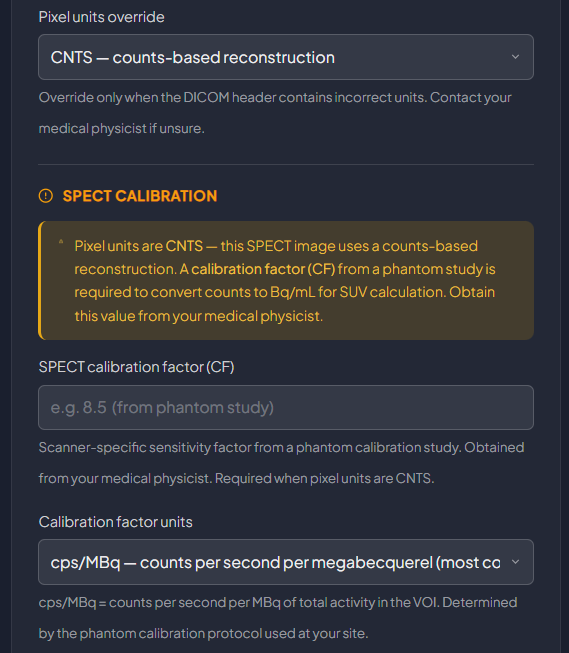
NuQ SUV Calculator — SPECT calibration factor entry with unit selector
  • QIBA-compliant scaling factors — SUVbw, SUVlbm (Janmahasatian, recommended), SUVlbm (James, legacy), SUVbsa (DuBois)
  • SPECT calibration factor entry — tied to your scanner's phantom study
  • Full parameter transparency — manual overrides flagged in the result and export
  • Segment SUV — per-ROI results for PET and SPECT alike
Research Use Only

Intended for research and non-diagnostic quantification — not to inform individual patient treatment decisions.

Frequently Asked Questions

Common questions about NuQ.

From nuclear medicine physicians, medical physicists, and radiopharmaceutical therapy trial teams.

Anything else? Contact us before you request evaluation access.

No. NuQ runs locally, not in the cloud — a local Django server displayed in a desktop window. No internet connection or data transmission is required for normal use.
Audit trail and record integrity are built in, in line with 21 CFR Part 11: every QC result and schedule change carries a secure, computer-generated, time-stamped audit trail of the operator entries and actions that created or modified it, and changes never obscure previously recorded information. Every report and registry entry can be reproduced as an accurate and complete copy, suitable for inspection, review, and copying. Ask us for the documentation package relevant to your trial's validation plan.
Depends on the context. For a clinical trial, NuQ runs as part of Oncosia's role as the trial's expert vendor in radiopharmaceutical trials — talk to us about your protocol. For routine departmental use, including sites running a high volume of therapeutic patients, DICOM Checker and ScanPointQ are available directly as a standalone license — request evaluation access and we'll set you up.
Yes. The protocol — reference values, timepoints, scanner rules — is one definition, not a per-site copy, and it exports and imports as JSON so it never has to be retyped from a document. Exactly how that reaches each site depends on the trial's setup; today, Oncosia typically coordinates that centrally.
A result appears at the console the moment the file is checked — Pass, Warning, or Mismatch, with a reason — not after a batch review days later. That's fast enough to catch and fix an issue while the patient and the injected dose are still there.
A timepoint that would fall outside scanner hours or on a public holiday is flagged as soon as the schedule is calculated, not on the day. ScanPointQ also suggests an alternative injection time that would clear it — whether that's practical is still the treating team's call, but catching the conflict early gives them the chance to decide.
Yes — and that's often exactly the right moment. A site showing a pattern of missing or incomplete timepoints mid-trial is a natural point to introduce scheduled, conflict-checked appointments going forward, without needing to redo anything already collected.
No — research use only, in a trial or in routine practice alike, not for individual diagnostic or treatment decisions. The DICOM Checker and ScanPointQ are not subject to this restriction.
Request Evaluation Access

See NuQ on your own trial or protocol.

Tell us about your trial or department and we'll set up access — as part of a trial engagement, or as a direct license for routine departmental use — to DICOM Checker, ScanPointQ, and the SUV Calculator.

Request Evaluation Access

Evaluation access is given readily — reach out and we'll get you set up.